Blog Archive

Showing posts with label How to / Tips n Tricks. Show all posts

How to Update iOS

How to Download and Update iOS

Download and Update iOS for iPhone, iPod Touch, iPad
To update iPhone or iPod iOS software you can download and install the new iOS update directly from iTunes, or you can first download the iOS ipsw file and than install it in your device using iTunes (iOS 4.3, iOS 4.2, iOS 4.1) .  iTunes also can  restore your device iOS software, which puts iPhone or iPod touch back to its factory condition. iOS update requires Apple iTunes, Windows or Mac computer with USB 2.0 port.

How to Download and Update iOS directly from iTunes
To download and update iOS directly with iTunes for iPhone, iPod Touch or iPad you will have to follow these steps:

1. Make sure you are using iTunes 8 or above. Connect your iPhone to your computer.
2. When iTunes opens, select your iPhone under Devices in the Source List on the left.
3. In the iPhone Summary pane, click Check for Update.
4. Click Download and Install. Do not disconnect your iPhone until the update has finished.

How to Update iOS for iPhone, iPod Touch using the Downloaded IPSW file
You can download the latest iOS IPSW update file is first and install it using iTunes to your iPhone, iPod Touch or iPad by following these steps:

1. Download the iOS firmware for your device. (Download iOS 4.3, iOS 4.2, iOS 4.1)
2. Connect your iPhone (iOS devise) to your computer.
3. When iTunes opens, select your iPhone under Devices in the Source List on the left.
4. OPTION-click (on Macs) or SHIFT-click (on Windows) on the Update button in iTunes.
5. Now you will be able to tell iTunes to use the IPSW file you downloaded to update your iPhone, iPod Touch, iPad.

How to Restore iOS: If you choose to restore, all data is erased from iPhone or iPod, including songs, videos, contacts, photos, calendar information, and any other data. All iPhone or iPod settings are restored to their factory condition.

GreenPois0n iOS 4.2.1 Jailbreak

Jailbreak iPhone, iPod Touch, iPad iOS 4.2.1 with GreenPois0n
Download GreenPois0n iOS 4.2.1 Jailbreak for Windows ( XP, Vista, Windows 7 64-bit)
Download GreenPois0n iOS 4.2.1 Jailbreak for Mac OS

GreenPois0n iOS 4.2.1 Jailbreak for iPhone, iPod Touch, iPad  
GreenPois0n iOS 4.2.1 Jailbreak

GreenPois0n jailbreak tool has updated for the latest iOS 4.2.1 firmware to jailbreak your iPhone, iPod Touch, iPad. After GreenPois0n jailbreaks your device, will able to download additional applications, extensions and themes that are unavailable through the official App Store, via installers such as Cydia. Your jailbroken iPad, iPhone or iPod Touch running iOS can still use the App Store and iTunes and other normal functions.

GreenPois0n Jailbreak Instructions:

  1. Download GreenPois0n jailbreak tool
  2. Plug the device to your computer using the USB cable
  3. Quit iTunes if it shows up
  4. Start greenpois0n.exe (greenpois0n.app in MAC OS)
  5. Turn Off your device
  6. Click “Prepare to Jailbreak (DFU)” and follow the instructions:

  • Press and hold down Power/Sleep button for 3 sec
  • Continue holding Power button, press and hold the Home button for 10 sec
  • Release the Power button, continue holding the Home Button for 15 sec

  7. The device will boot a 1st time with verbose text on screen. This operation will install the jailbreak on the device. 
  8. the device will reboot normally 
  9. start the Loader application (green icon on the SpringBoard), and follow instructions to install Cydia

GreenPois0n 1.0 RC5 supported device:

  • iPhone 4, iPhone 4 Verizon, 3Gs
  • iPod Touch 4G, 3G, 2G
  • iPad 1G

Get US IP Address with Hide IP Easy

Get US IP Address with Hide IP Easy to surf the internet anonymously. Hide IP Easy released on January 24th, 2011. Hide IP Easy. Download Free Trail US IP only Hide IP Easy 5.0 to get US IP address. Hide IP Easy Website

Get US IP Address with Hide IP Easy

Hide IP Easy is a small and easy to use tool that allows you to hide your real IP with a fake one to surf the internet anonymously. Some time some websites are only available for US and blocks visitors from specific countries, YouTube blocks some of its videos saying "This video is not available in your country". Hulu, Pandora, Google Voice detects your original IP address and if your IP is from outside of United Sate they will block you. You can use US IP address with Hide IP Easy to bypass US only websites like Hulu, Pandora, Google Voice and use them from out side of United State. Hide IP Easy let you decide fake IP of which country to use by choosing a country from the Choose IP Country window.

iPhone 3D Holographic Text Maker - Holographium Video Review

iPhone 3D Holographic Text Maker

Create 3D HolographicFloating Text Image

Holographium app can create 3D Holographic floating Text image with your iPhone and a digital camera. Here is a video demonstration (via Segmaster) that shows how you can create perfect holographic floating Text using iPad. At its launch Holographium app was free for iPhone, iPod touch, and iPad. Now it is a available for $1.99 at App Store.

Holographium iPhone App Related:
Create 3D Holographic Text with iPhone Holographium
Play Virtual Soccer with iPhone Camera
Yodm3d Free 3D Virtual Desktop
iPhone Camera Translator

We Are Unable To Find iTunes On Your Computer - Fix

We Are Unable To Find iTunes On Your Computer - Fix

We Are Unable To Find iTunes On Your Computer - Fix
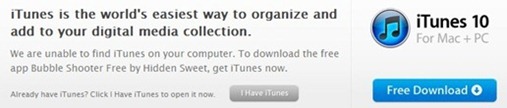
If you browse iTunes App Store website with Opera (or in Chrome), you may get this  message on top of a application page  even if you have installed iTunes properly, “We are unable to find iTunes on your computer.”

Because App Store website is unable to find iTunes on your computer the it dose not open that particular App Store webpage in iTunes when you click on that blue ‘View In iTunes’ button. Instead it redirect you to the iTunes download  page.

Opera View In iTunes Fix for App Store

Opera View In iTunes Fix for App Store:

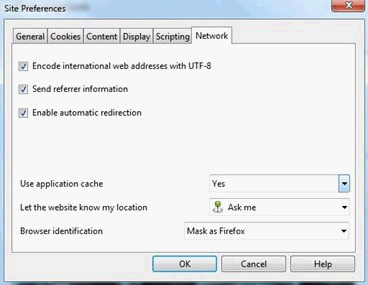
1. Visit a app store page itunes.apple.com with Opera

2. Right Click on the page blank area for the drop down menu

3. Click on “Edit Site Preferences …”  for the drop down menu

4. Go to the “Network” tab for Site Preferences option box

5. Choose “Mask as Firefox” from ‘Browser Identification’  dropdown option

6. Refresh the page, now the ‘View In iTunes’ button will launch iTunes properly

Opera View In iTunes Fix Related:
Opera : Add More Speed Dial Buttons
iTunes 10.1 with AirPlay for iOS 4.2
Chrome View In iTunes Fix
Remove Opera ‘Menu’ Text

Play AVI FLV Videos in iPhone iPod Touch

VLC for iPhone iPod Touch

Play AVI FLV Videos in iPhone iPod Touch
The new free VLC Media Player for iOS (iPhone, iPod Touch, iPad) allows you to play AVI, FLV, WMV or MKV Video in iPhone and iPod Touch without converting them to mp4 or m4v video format. With power of VLC Media Player codec your iPhone, iPod Touch and iPad  now can play wide variety of video formats in faster and smoother.

Play AVI FLV Videos in iPhone iPod Touch

After installing VLC Media Player for iOS in your iPhone, iPod Touch or iPad connect it to your computer. In iTunes, select your device and click the ‘Apps’ tab where you will find ‘VLC’ in the ‘File Sharing’ section. Transfer AVI, FLV, WMV, MKV or any other video file fast & easy to your iPhone, iPod Touch by just adding them to VLC File Sharing section and play them without converting.

VLC Media Player for iPhone, iPod Touch is still in early stage, you may find some lag while playing HD 720p or very large video files. These issues will be fixed in the future versions of  VLC for iOS.  If you want to convert AVI, FLV, WMV or MKV video file to reduce the file size for your iPhone or iPod Touch, use the free Video and audio converter XMedia Recode.

Chrome View In iTunes Fix

2010-11-09_192312

Chrome View In iTunes Fix
It appears that apple’s iTunes Store website dose not work properly with Google Chrome (windows) when you click on the ‘View In iTunes’ button to launch the iTunes application. There are two Chrome extensions available that can fix this iTunes launching problem by hiding its browser identity and appearing as Safari, Internet Explorer or  a Firefox agent to the iTunes Store website.

a. Chrome View In iTunes Fix with User-Agent Switcher :
After installing User-Agent Switcher extension for Chrome go to its Option panel by right clicking on its icon. Under the “Custom Domain List” add new Custom-Domain with :

Domain: http://itunes.apple.com

navigator.userAgent: Mac Safari 4
(select ‘Mac Safari 4’ from dropdown list)

navigator.vendor : Google, Inc.

This User-Agent filter will switch your browser agent to ‘Mac Safari 4’  when you are visiting iTunes Store website.

b. Chrome View In iTunes Fix with IE Tab:
IE Tab extension helps Chrome to emulate as Internet Explorer and prevent the Chrome View In iTunes launching bug. Install IE Tab in Chrome and open a new IE Tab with a iTunes Store website URL (Click on the IE Tab icon when you are on iTunes Store). In this IE Tab the a ‘View In iTunes’ button click will launch the iTunes application with the appropriate webpage.

Add “http://itunes.apple.com” in the IE Tab Options Auto URLs section to open iTunes Store website in IE Tab every time you visit.

Check .Net Framework Version

Framework-Detector_2

Framework Detector 2.0 File Size: 23 KB
Download Free Framework Detector 2.0
Framework Detector 2.0 Website

Check .Net Framework version using Framework Detector open source tool. Framework Detector shows you which version of .Net Framework is installed on a computer.

What is My RAM : RAM Size and Type of RAM

What is My RAM Size
What is My RAM Size

What is My RAM Size: You can find out how much of RAM (Random Access Memory) is installed in your computer from Windows System Properties. Hold down Windows key and Pause/Break key (Win Key + Pause/Break Key ) at the same time to open the System Properties with the memory size of your RAM.  This keyboard shortcut works on Windows XP , Vista and Windows 7.

What is My RAM Type
What is My RAM Type

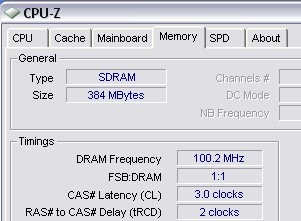
What is My RAM Type: You need to download a small application called CPU-Z to know your RAM in detail. CPU-Z will show your RAM type (DDR or SD RAM), memory size, channels (triple channel or dual channel), frequency rates and more. CPU-Z is a all in one tool to know your PC hardware in detail.

Detect the Type of RAM in Your Computer
Free Windows Driver Backup Software
How Fast is Your System?
PC SysInfo Screensaver
System Explorer

Remove Opera ‘Menu’ Text from Menu Button

Remove Opera ‘Menu’ Text from Menu Button
Opera Menu Button Text Opera Menu Button

By default the Opera 10.60 shows its top menu button logo with the ‘Menu’ text . The Opera  menu button is in the same line of its tab panel and you will feel it is wasting some space with the ‘Menu’ text when it is loaded with dozens of tabs. You can remove the Opera ‘Menu’ Text from its Menu Button by :

Right Click On It –> Customize –> Appearance –> Style and select "Images Only"

How to Change KMPlayer Skins

How to Change KMPlayer Skins
You can change The KMPlayer skins from the player’s Skin menu or you can change the skin by opening a KMPlayer skin file (.ksf files) with double click.

KMPlayer  Skin:MAC Skin

Right Click on KMPlayer , from the context menu ‘Option’ enable ‘Advance Menu’ to show the ‘Skin’ menu option. Now you can change your KMPlayer skin from the ‘Skin’ menu, that contains all of your KMPlayer skins.

The KMPlayer skins are stored in its installation directory’s ‘Skins’ folder. The KMPlayer’s Skin Menu shows all the KMPlayer skin file (.ksf files) that are available in this folder. When you double click a KMPlayer skin file (.ksf file), it copies itself to the KMPlayer skin folder and opens KMPlayer with it.

Note: The KDE KMPlayer is a deferent application than The KMPlayer.

Office 2010 Trial Day Extender

Extend Office 2010 Trail days: With free Office 2010 Trail Extender tool you can extend your trail days of 30 days trail version of Microsoft Office 2010 to 180 days. Office 20010 Trail Extender uses rearm feature to extend your trail days. The Microsoft Office 2010 rearm is a official feature was that made for corporate users. You need to rearm your Microsoft Office 2010 trail version with Office 2010 Trail Extender, before it has to be activated.

Extend Office 2010 Trail days to 180:
Office 2010 Trial Day Extender

You can rearm Microsoft Office 2010 versions RTM (14.0.4760.1000) 5 times, that extends your trail use to 150 more days (5 rearm x 30 days) with your original Microsoft Office 2010 30 days trail period (total 180 days trail use).

Download free Office 2010 Trail Extender
Office 2010 Trail Extender website

Google Hacks with Google Advance Search

Google Hacks with Google Advance Search
Google Hacks

Google Hacks 1.6 Release Date: 2009-9-29
Google Hacks 1.6 File Size: 824 KB / Windows All
Download Free Google Hacks 1.6
Google Hacks 1.6 Website

Google Hacks with Google Advance Search : Google Hacks is a educational purpose open source tool, that uses the power of Google search engine to fiend specific type of content form the internet. Google Hacks makes it easy to find and download files including, music files (mp3, wam, ogg), Videos files (mpg, avi, wmv, divx, flv), Document files (pdf. rtf, .doc, chm), Application files (exe, zip, rar ), torrent files and other specific types of content by using Google’s advanced search features.

Google Hacks also features two type of proxy, which keeps you stay anonymous using Google services as a proxy server when visiting a website.

Total Uninstall How to Use

How To Use Total Uninstall

1.Start the Total Uninstall wizard before installing a new application, enter a friendly name for monitored application and scan the system.

2.Run the application(s)/program setup.

3.Start the wizard again or continue if it's still active to re-scan the system and detect the system changes.

4.View the changes. Close the wizard.

5.Run the Total Uninstall when you want to view or restore the changes made by monitored application(s)/installing process.

Keep Important Websites Cookies and Remove Rest Of All


Keep Important Websites Cookies : Cleaning browser’s private data is an essential thing to do for your online privacy. Most of the browser’s built-in  Private Data Remover deletes history, cache and cookies by browsing session or a time period. A password protected website stores your login data for a certain time in the browser cookies. When you removes these cookies login data data are lost. You have to give your user name and password  again to all password protected website. You may have some website, like Gmail, Facebook, MySpace, YouTube, where you want to stay logged in for a long time. Browser’s built-in cleaner are not smart enough to filter specific websites and clean the rest of all websites data that you want to remove.

Keep Important Websites Cookies

A smart cookie cleaning tool like CookieCrumbler can remove browser cookies by your filtering rules. CookieCrumbler can filter cookies by its Name, Content, Path or Domain values. You can set a rule to Keep or Remove a specific websites cookies or a cookies that contains certain value.

How to Install IE6 IE7 IE8 and Run Multiple Internet Explorer Versions

2009-08-04_031236 
How to Install IE6 IE7 IE8 :   There are some tools that serves the purpose  of previewing websites in different versions of Internet Explorer for web developers. An Internet Explorer Plug-ins, Add-on developer may need to install multiple Internet Explorers in different windows version for testing and debugging . In this case the issues of windows version (Windows XP, Vista , Windows 7) and its bit edition (32-bit, 64-bit) comes in to play.  Running multiple versions of Internet Explorer at same the time does not works always smoothly. Its preferable to install these Internet Explorers in a virtual machine or create a windows system restore point. Here is a solution from tredosoft.com to install and run IE6 IE7 IE8 in same time ( Tested on Windows XP x86 ) :


1. Download and install Internet Explorer 6 and Older Version of IE from MultipleIE Setup .


2. Download Internet Explorer 7 standalone Installer to install IE7.


3. Download and install Internet Explorer 8


and your are ready to use IE6 IE7 and IE8 in same time, in same windows system.


Maya Personal Learning Edition Download

Autodesk Maya Personal Learning Edition 7.0.1 Release Date: 2006-6-29
Autodesk Maya Personal Learning Edition 7.0.1 File Size: 260 MB / Windows

Autodesk Maya Personal Learning Edition 7.0.1 Website
Download Free Autodesk Maya Personal Learning Edition 7.0.1

Maya Personal Learning Edition

Autodesk Maya Personal Learning Edition is a special version of the award-winning Autodesk Maya software, which will provide free access to Autodesk Maya for non-commercial use.

Autodesk Maya Personal Learning Edition gives graphics and animation students, industry professionals, and those interested in breaking into the world of computer graphics an opportunity to explore all aspects of the award-winning Autodesk Maya Complete software in a non-commercial capacity.

Winamp Skin Creator

Winamp Skin Creator Release Date: 2009-1-6
Winamp Skin Creator File Size: 1.2 MB / Windows All

Winamp Skin Creator Website
Winamp Skin Creator 1.1 Download Link is Currently Brocken

Please Try SkinWamp to Make Modern Winamp Skin Visually

How to Create Winamp Skin with Winamp Skin Creator:
 Winamp Skin Creator

With Winamp Skin Creator you can easily create skins for the popular Winamp player. Winamp Skin Creator will help you to combined your graphics as Winamp skin with out any skin coding. First design your Winamp Skin’s Main Form, Equalizer and Playlists in a graphics editor like Photoshop and Paint.NET and save it as Image. Load the Image in Winamp Skin Creator and it will preview your skin with winamp player buttons, bars and other components. Adjust the size, position  and color of winamp players buttons and bars with your winamp skin. Finally press the ‘Create Skin’ button to save your new winamp skin.

Yahoo Messenger Hider : Quickly Hide Yahoo Messenger

Yahoo Messenger Hider 1.3.1 Release Date: 2009-4-27
Yahoo Messenger Hider 1.3.1 File Size: 457 KB / Windows XP / Vista

Yahoo Messenger Hider 1.3.1 Website
Download Free Yahoo Messenger Hider 1.3.1

Hide Yahoo Messenger : Yahoo Messenger Hider is a tool to hide Yahoo Messenger windows and tray icon quickly. Yahoo Messenger Hider can hide the Messenger main window, chat window, webcam window and now supports new Yahoo Messenger 9.  Pressing F11 will show/hide the main messenger window, whereas F12 will enable you to show/hide all messenger windows.

Yahoo Messenger Hider Requires Yahoo! Messenger and .NET Framework 2.0 or above 

Yahoo! Messenger Tweaker : Hack Yahoo Messenger To Remove Ads and Multiple Account Login

Yahoo! Messenger Tweaker Release Date: 2008-5-15
Yahoo! Messenger Tweaker  File Size: 3.1 MB 
Download Free Yahoo! Messenger Tweaker 1.3.1.0 for Yahoo! Messenger 8/9

Hack Yahoo Messenger To Remove Ads and Multiple Account Login
2009-05-23_042451

Yahoo! Messenger Tweaker is a free tool that hacks in to the Yahoo Messenger ( Yahoo! Messenger 8 and 9 ) files and registry and gives you the possibility to customize your Yahoo Messenger's settings that are unavailable in the normal Yahoo! Messenger state. Yahoo! Messenger Tweaker’s best hack is, its ability to remove the ads form the messenger. Yahoo! Messenger Tweaker also enables you to run multiple Yahoo! Messenger for multiple account login. Yahoo! Messenger Tweaker offers  and to easily restore your configuration.