Blog Archive

Showing posts with label System Utilities. Show all posts

Free Windows Registry Life Optimizer

Free Windows Registry Life Optimizer

Registry Life is a free Windows registry optimization utility that can find and fix registry errors to make your system run smooth. Download Free Registry Life 1.27 Final Optimizer for Windows XP, Vista, Windows 7 (32-bit and 64-bit). Registry Life Final File Size 7.6 MB. Registry Life Website

The system registry is one of the most important components of the Windows operating system. The stability of the system's operation depends upon it being in working order, and the speed of the applications you work with depends upon the volume of data contained in it.

Free Windows Registry Life Optimizer was designed to be a small tool that will help you correct errors in the Windows registry and optimizes it, increasing the working speed and stability of the system. Windows Registry Life Optimizer is a compact, simple to use, and FREE solution for servicing your system registry.

Security Essentials & ForeFront Client Security Update

Microsoft Security Essentials & ForeFront Client Security Definition Updates 1.99 released on March 3rd, 2011. Download Free Microsoft Security Essentials & ForeFront Client Security Definition Updates 1.99 (61.8 MB). Microsoft Windows Security Essentials & ForeFront Client Security Definition Updates 1.99 Website

This package will help you install the latest Microsoft ForeFront Client Security definition updates. To update Microsoft Windows Security Essentials & ForeFront Client security definition you must be running an x32-based version of Windows to run an x32-based version of Microsoft ForeFront Client Security, or an x64-based version of Windows to run an x64-based version of Microsoft ForeFront Client Security.

mpam-fe.exe
Antimalware Full + Engine package (for x86, amd64, ia64)
Contains engine (mpengine.dll), mpasbase.vdm, mpasdlta.vdm, mpavbase.vdm, mpavdlt.vdm, mpsigstub.exe. 

mpam-d.exe
Antimalware Delta package contains AV and AS signatures.
Contains mpasbase.vdm, mpasdlta.vdm, mpavbase.vdm, mpavdlta.vdm, mpsigstub.exe.

Free Wise Disk Cleaner

Wise Disk Cleaner is a free, fast and easy to use disk cleaning software to free up disk space by deleting junk files that are no longer used by any software on your system. Download Free Wise Disk Cleaner 5. Wise Disk Cleaner 5 File Size 4.3 MB. Wise Disk Cleaner 5.91 Build 269 Website.

Free Wise Disk Cleaner

Wise Disk Cleaner scans junk files and delete these junk files in windows system, your system will can work better and more quickly.Wise Disk Cleaner can scan more than 50 types of junk files, and you can freely add the type of junk file which you consider.

After Wise Disk Cleaner analyzes your system for find junk files, you can individually view each of the junk file found and call up a detailed description. If you wish, you can also clean up all junk files automatically.

Ad-Aware Internet Security Pro 9

Ad-Aware Internet Security Pro 9.0 File Size 124 MB
Download 30 days trial Ad-Aware Internet Security Pro 9.0.0
Ad-Aware Internet Security Pro 9.0 Website

Ad-Aware Internet Security Pro 9.0

Ad-Aware Internet Security Pro 9.0 increases your productivity and enhance computer performance by not only detecting and removing malicious applications that eat up memory and steal bandwidth, but going a step further to clean your system by removing all traces of the infection. Ad-Aware Internet Security Pro 9.0 safeguards your personal or corporate security with the help of advanced options and standalone tools. Ad-Aware Internet Security Pro includes Process Watch, AutoStart Manager, and Hosts File Editor – to provide an additional layer of protection and control.

Ad-Aware Internet Security Pro 9.0 relieves the burden of constant cyber attacks with comprehensive malware protection; Ad-Aware Internet Security Pro 9.0 detects and blocks over two million threats, including viruses, spyware, Trojans, bots and rootkits.

KillProcess for Windows 7 64-bit

KillProcess

KillProcess for Windows 7 64-bit
KillProcess can terminate almost any process on a computer, including any service and process running in the Windows system (Run it in Admin Mode). Even protected Microsoft system processes can be terminated.

KillProcess is way more powerful than the Windows Task Manager in other terms than speed. KillProcess can also scan the running processes on the computer, and kill them on sight, much like an anti-spyware application would. In KillProcess however you are in charge of which applications should be allowed to run or not a and that applies to the computer as long as you say so.

Download Free Portable KillProcess 2.44 (1.3 MB)
KillProcess for Windows XP, Vista, Windows 7
KillProcess Website

KillProcess Related Software:
Windows Security Process Explorer
Windows 7 Process Hacker
Free Process Freezer
Tweak Windows 7

Windows Security Process Explorer

Windows Security Process Explorer
Security Process Explorer

Security Process Explorer (formerly Glarysoft Process Manager) is an enhanced windows task manager with process security rating. This Windows security process explorer provides advanced information including file name, directory path, description, memory and CPU usage as well as a unique security risk rating about programs and processes running on your Windows.

With Security Process Explorer you can easily find and remove insecure and unnecessary background processes  with the help of its security risk rating system. This process security rating is conclusive and relies on the expertise of the user to determine whether the process should be terminated or removed.

Security Process Explorer 1.6 Release Date: August 12th, 2010
Security Process Explorer 1.6 File Size: 1.3 MB
Download Free Security Process Explorer 1.6
Security Process Explorer Website

Free Auslogics Registry Defrag

Free Auslogics Windows Registry Defrag
Auslogics Registry Defrag

Auslogics Registry Defrag File Size: 5.1 MB
Download Free Auslogics Registry Defrag 6.0.3.30
Auslogics Registry Defrag Website

Auslogics Registry Defrag is an extremely useful windows registry defragmentation software that will keep your registry as compact as possible. Microsoft Windows and various program access the registry a few hundred times a second. As a result keeping the registry defragmented and as small as possible is important for optimum windows system performance. This free Windows Registry Defrag tool will improve your windows system and other application’s performance.

Free Windows 7 Registry Defrag Software

Windows 7 Registry Defrag Software
2010-07-31_213817

WinMend Registry Defrag Release Date: July 29th, 2010
WinMend Registry Defrag File Size: 2 MB for Windows 7 & earlier
Download Free WinMend Registry Defrag 1.3.4
WinMend Registry Defrag Website

WinMend Registry Defrag is a registry defragmentation and cleanup tool for Windows 7 and earlier version of Windows. WinMend Registry Defrag can rebuild registry index safely and clear waste registry space to make it easy for Windows and applications to find required data more efficiently. After Windows registry is reorganized with Registry Defrag, you will find the performance of the operating system has been significantly improved. This free Windows 7 Registry Defrag tool is safe, reliable, simple to understand and use. You will be required to reboot the system after running Registry Defrag to work on the registry.

Windows 7 Security Essentials 64 Bit

Microsoft Security Essentials 1.0 Release Date: June 29th, 2010
Microsoft Security Essentials File Size: 11.3 MB
Download Free Microsoft Security Essentials 1.0 32 bit Vista & Windows 7
Download Free Microsoft Security Essentials 1.0 64 bit Vista & Windows 7
Microsoft Security Essentials Website

Windows 7 Security Essentials 64 Bit

With Microsoft Security Essentials, you get high-quality protection against viruses and spyware, including Trojans, worms and other malicious software for Windows XP Vista and Windows 7. And best of all, there are no costs or annoying subscriptions to keep track of. Security Essentials runs quietly in the background, only alerting you if there's something you need to do. Security Essentials doesn't use a lot of system resources, so it won't get in the way of your work or fun.

Avira Antivir Virus Definition File Update 29 June 2010

main_right_en%5B3%5D[1]

Avira Antivir Virus Definition File Update 29 June 2010 File Size: 36.8 MB
Download Free Avira Antivir Virus Definition File Update 29 June 2010
Avira Antivir Virus Definition File Update 29 June 2010 Website

Max PC Privacy for Windows 7

Max PC Privacy 6.13 File Size: 3.2 MB
Download 15 days trial Max PC Privacy 6.13
Max PC Privacy 6.13 Website

Max PC Privacy for Windows 7: Max PC Privacy is a comprehensive solution to boost your windows 7 system performance and clear all your, on and off line activities. Max PC Privacy is exclusively designed to clear all the Internet history, system history & cache, registry data.

Max PC Privacy for Windows 7

The protect privacy feature in the Max PC Privacy for your Windows 7, deletes your list of favorite sites, site user names, passwords, file and folders, thus preventing others from tracking your online and offline activities.

Windows 7 Application Compatibility Toolkit 5.6

Windows 7 Compatibility Tool: The Microsoft Application Compatibility Toolkit 5.6 (ACT) helps customers understand their Windows application compatibility situation by identifying which applications are compatible with the Microsoft Windows XP, Vista, Windows 7 operating system and which  require further testing.

Windows 7 Application Compatibility Toolkit :
The Microsoft Application Compatibility Toolkit

ACT helps customers lower their costs for windows application compatibility testing, prioritize their applications, and deploy Windows Vista, Windows 7 more quickly.

You can use the ACT features to:

  • Verify an application's compatibility with a new version of the Windows 7 operating system, or a Windows Update, including determining your risk assessment.
  • Become involved in the ACT Community, including sharing your risk assessment with other ACT users.
  • Test your Web applications and Web sites for compatibility with new releases and security updates to the Windows Internet Explorer
Microsoft Application Compatibility Toolkit 5.6 File Size: 12.3MB - 32.4MB
Download Free Microsoft Application Compatibility Toolkit 5.6.7320.0
Microsoft Application Compatibility Toolkit Website

X-Setup Pro Free Windows Tweaking Utility

X-Setup Pro 9.2.100 Release Date: 02-06-2010
X-Setup Pro File Size: 42MB
Download Free X-Setup Pro [GIVEAWAY] 9.2.100
X-Setup Pro 9.2.100 Website

X-Setup Pro registration key: XSA092-11TA9R-8K12YT

X-Setup Pro is the ultimate windows system configuration or tweaking utility which is now available for free. X-Setup Pro is a nice tool that is not yet another Windows Hacker; it is the ultimate tool for black belt windows system tuning and tweaking.

X-Setup Pro Free Windows Tweaking Utility

From simple boot options up to server settings and hardware settings, internet settings or Office options, X-Setup Pro allows you to change more than 1500 (!!) settings with some simple button clicks. This makes X-Setup Pro the most complete hacker/tweaker ever available!

Because these settings change often and fast, X-Setup Pro uses plug-ins - they are very small (2-4 kB) so updating them is easy too. X-Setup Pro can even download updated or new plug-ins directly from the X-Setup Pro web site. Best of all, you can always view the source for any plug-in! And with the also available information inside X-Setup Pro SDK you can even create your own plug-ins or wizards and use them in X-Setup.

For network administrator X-Setup Pro can be a huge help. Simply turn recording on, change the settings you want and it generates a *.REG file on the fly that can be deployed to thousands of computers without installing X-Setup Pro. You may also chain-install X-Setup Pro.

BitDisk - Recover Windows to Perfect State

Recover Windows to Perfect State

Probably everyone of us is has had the situations when we accidentally deleted important files or even witnessed an operating system crash. But at that moment it's usually too late, our crucial data is lost, the windows system doesn't want to restore, and nothing can be recovered.

Preventing these exact situations is what BitDisk 7 was created for. Once you have it installed on your computer, nothing will vanish or disappear from it. Now every time you boot the computer, it will be in the same perfect state that you have defined for it. So, how does it work after all? 

The moment you install BitDisk7 on your computer, all and any changes that take place thereafter are not registered. Instead, they are stored in a special container on the hard drive and are removed after reboot, bringing the computer back to its original "perfect" state.

BitDisk features an easy-to-use interface and is perfect for both home and office users. It protects from virus attacks, unstable software, user misconduct due to incompetence or intentional abuse, malware and spyware, Windows crashes, loss of any software and files.

Download Free 10-uses Trial BitDisk 7.02
BitDisk OS : Windows XP, Vista , Windows 7 and all 64-bit Windows
BitDisk 7.02 Website

Norton 360 for Windows 7

Norton 360 Release Date: 2010-3-11
Norton 360 File Size: 41.4 MB 
Supports Windows XP / Vista / Vista64 / Windows 7 / Windows 7 x64
Download 30 days trial Norton 360 4.0.0.127
Norton 360 Website

Norton 360

Norton 360 is today’s fastest and lightest all-in-one solution for protecting your PC and all your online activities. Automated and easy to use, Norton 360 works quietly in the background without impacting PC performance—and with virtually no action required on your part. A comprehensive security, tune-up, and backup solution, it provides award-winning protection against viruses, spyware, hackers, botnets, and more.

Norton 360 detects phishing and hacked or virus-infected websites to protect you from exploits. Identity protection and anti-fraud technologies identify unsafe websites and suspicious sellers in your search results so you can shop and surf with confidence.

Norton 360 automates PC tune-ups to help make your computer run faster, while an improved Smart Startup Manager provides recommendations to help keep your PC running at peak performance. Backup and restore capabilities protect your irreplaceable photos, movies, music, and other important files from loss. You will have the possibility to easily recover them from Symantec online storage service which is provided at no extra charge.

Free Process Freezer : Suspend Process Without Losing Data

Free Process Freezer :

Free Process Freezer : With Windows Process Manager is not possible to resume after terminating a running  problematic process. Process Freezer allows you to suspend the problematic process and resume it later without losing any data.

Process Freezer shows list of processes running in the system. From the list user should select a process that need to be suspended and press the “Suspend Process” button. All suspended Process can be  resumed with the “ Resume Process” button.

Free Process Freezer 1.16 Release Date: 2010-2-25
Free Process Freezer 1.16 File Size: 1.9 MB / Windows All
Download Free Free Process Freezer 1.16
Free Process Freezer 1.16 Website

System Explorer 2.1 for XP Vista Windows 7

System Explorer 2.1.1.2824 Release Date: 2010-3-7
System Explorer 2.1.1.2824 File Size: 1.3 MB / XP Vista Windows 7
Download Free System Explorer 2.1
Download Free System Explorer Portable 2.1
System Explorer Website

System Explorer for XP Vista Windows 7
Windows System Explorer Portable 2.1

System Explorer brings all essential system monitoring and maintenance tools in one place. The new version of System Explorer 2.1 supports Windows XP, Vista and Windows 7. System Explorer has the effective windows optimization utilities that enables user to tweak Windows Services, Windows Startup, IE Addons, Network Connections to get the best out of the system.

System Explorer monitors the system process, performance and other important windows information and display them in details. System Explorer also includes an installers/uninstallers (like Total Uninstall) to manage windows installed applications. System Explorer monitors making of registry & files snapshots to compare of system changes.

WinUtilities Pro Free Download

WinUtilities  Free Download
WinUtilities  Free

WinUtilities  9.41 Release Date: 2010-2-4
WinUtilities  9.41 File Size: 6.8 MB / Windows All
Download Free WinUtilities [GIVEAWAY] 9.41 [GIVEAWAY]
WinUtilities  9.41 Website

WinUtilities is a collection of tools to optimize your system performance and to remove unneeded files and internet tracks. WinUtilities allows you to delete your application and internet history, find and remove invalid registry entries, manage your cookies and more. With a startup Cleaner and manager you can also see what programs start automatically with windows and optionally disable selected items.

Furthermore, WinUtilities includes options to find true duplicate files, fix or remove broken shortcuts and safely uninstall software. Other features include secure file deletion, Application Protect, Parent Control and Monitoring, Files Tools and more.

WinUtilities 9.41 Related Software:
Glary Utilities : Free Windows Maintenance Solution
Windows 7 Manager : Free Windows 7 Optimizer
Avast! Free Antivirus 5 Download
Free Advanced System Care Pro
TuneUp Utilities 2009

Avast! Free Antivirus 5 Download

Download Avast! Free Antivirus 5
Avast! Free Antivirus 5 Download

Avast! Free Antivirus 5.0.396 Final Release Date: 2010-1-30
Avast! Free Antivirus 5.0.396 Final File Size: 39.5 MB
Avast! Free Antivirus works Windows 2K / XP / Vista / 2008 / Windows 7 /x64
Download Free Avast! Free Antivirus 5.0.396 Final
Avast! Free Antivirus Website

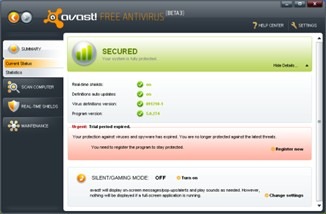
Avast! Free Antivirus 5 Download : Avast Free 5 Antivirus, formerly known as the avast! Home Edition, protects you with multiple guards. The antivirus, antispyware, and heuristics engines form a security core that also includes multiple real-time shields. The adjustable mail and file system shields join the pre-existing behavior, network, instant messaging, peer-to-peer, and Web shields. The behavioral shield is a common-sense feature, as security software publishers leverage their large user bases to detect threats early and warn others. Other new features include a silent-gaming mode and an "intelligent scanner" that only looks at changed files after establishing a baseline.

Avast! Antivirus 5.0 now also comes with a completely revamped user interface for easier scanning. avast! Pro antivirus 5.0 offers a number of additional features, including a script shield and a process virtualization module, while avast! Internet Security 5.0 comes with an antispam filter and built-in firewall. Once installed, avast! runs silently in the background to protect your computer against all known forms of malware. Read more about Avast! Free Antivirus 5 Features.

Avast! Free Antivirus 5 Features

Avast! Free Antivirus 5 features :

· Core and detection
· Antivirus and anti-spyware engine
· State of the art scanning engine provides reliable protection against viruses, spyware and other forms of malicious software.

· Real time anti-rootkit protection
· Unique "on access" technology checks all kernel-mode drivers that the operating system is loading for signs of rootkit behavior. This enables even unknown rootkits to be detected and stopped before they can do any damage.

· avast! Community IQ
· Most samples we process come from sensors deployed throughout the avast! community in the Behavior shield and anti-rootkit modules. This is a unique source of data made possible only thanks to our huge user base. Most of the collected samples are analysed by a number of automated processes and only a small fraction of the samples need to be processed manually by our virus analysts.

· Code emulator
· When a suspicious executable is encountered (during both on-demand and on-access scanning), avast! is able to emulate the program’s code in an isolated environment. The code emulator is used for two purposes. First, it is used for generic unpacking. Secondly, it is used in the heuristics engine. Technically, this is done using dynamic translation, a method much faster than traditional emulation techniques.

· Heuristics engine
· Starting with version 5.0, avast! features a new heuristics engine designed to proactively detect malware undetectable with normal definitions. The heuristics engine is able to cover both binary (executable) and script malware.

· Potentially unwanted programs detection
· New in version 5.0, avast! now detects potentially unwanted programs, such as remote admin tools and commercial key loggers. Custom rules can be set for dealing with these types of programs.

· Scanning
· Boot-time scanner
· Allows you to scan your computer for infections before the operating system has started and before a virus can be activated (32-bit operating systems only).

· Command-line scanner
· Enables you to run a scan directly from the command line.

· Wake-up for scan
· Microsoft Windows is woken from sleep or hibernation mode, performs a scheduled scan, then returns back to sleep mode.

· Scheduled scanning
· Allows users to define the scan time and files to be scanned.

· avast! Intelligent Scanner
· Can reduce the number of required file scans by up to 80% through a white list of proven safe applications. Files identified as safe are not rescanned unless they change.

· Shields
· Behavior Shield
· Monitors activity on your computer using a number of sensors (file system, registry and network based) and reports/blocks any suspicious behavior.

· Behavioral Honeypots
· avast! sensors identify and monitor suspicious file activity on selected computers, automatically submitting files to the Virus Lab for additional analysis.

· File System Shield
· Real-time scanning of opened/executed files.

· Mail Shield
· Scans all incoming/outgoing e-mails for malware. For MS Outlook, a special plug-in is used. Other email clients are protected by a generic POP3/IMAP4/SMTP proxy. New in version 5, the proxy also supports scanning of SSL communication (gmail.com, sympatico.ca, ….)

· Web Shield
· Scans all visited web pages and checks all files, pages and java scripts downloaded from the internet. Thanks to the Intelligent Stream Scan feature, the Web shield doesn't slow down your web browsing.

· P2P Shield
· Checks files downloaded using P2P programs. - ABC, Ares, Azureus, BearShare, Bit Torrent, BitComet, BitLord, BitPump, CZDC++, Direct Connect, eDonkey, eMule, iDC++, iMesh, Kazaa, Kceasy, LimeWire, Morpheus, Opera's DC++, Overnet, Qtrax, Shareaza, SoulSeek, StrongDC++, uTorrent, Vuze, WinMX, Winny2, Zultrax.

· IM Shield
· Checks files downloaded while using instant messaging or “chatâ€� programs. - AIM (AOL Instant Messenger), Gadu-Gadu, gaim/Pidgin, Google Talk, ICQ, IM2 Messenger, Infium, Miranda, mIRC, MSN/Windows Messenger, Odigo, PalTalk Messenger, Psi Jabber Client, QIP, QQ, SIM, Skype, Tlen, Trillian, WengoPhone, XFire, Yahoo! Messenger.

· Network Shield
· Provides protection against network-based viruses. The module has two main components: a URL blocker, designed to block malicious URLs (as defined by the Virus Lab), and a lightweight intrusion-detection system.

· Updates
· Smart virus definition updates
· Incremental updating system minimizes the size of regular update files.

· Fast application of updates
· New format for the virus definition file speeds up application of updates into avast! 5.0 and reduces demand on CPU/memory, resulting in uninterrupted computer use.
· New format for the virus definition file means faster updates and reduces demand on CPU/memory, resulting in uninterrupted computer use.

· Gaming
· Silent/Gaming Mode
· New Silent/Gaming Mode automatically detects full-screen applications and disables pop-ups and other on-screen notifications without degrading security.

· Optimized for latest Intel Core i7 CPUs
· Critical sections of the avast! scanning engine code have been optimized to deliver unrivaled performance on the latest Intel chips.

· CPU optimization
· Multi-threaded scanning optimization
· avast! runs faster on new multi-core CPUs. A new avast! feature allows the splitting of large individual files between cores, accelerating the scanning process.

· Green computing
· Reduced demands on the disk drive result in lower energy consumption.

· Miscellaneous
· avast! iTrack
· Real-time graphic scanning reports.

· Graphical user interface
· Easy to navigate graphical interface.

· Automatic processing
· Infected files are processed automatically without requiring user instructions.