Blog Archive

Showing posts with label Templates / Themes / Skins. Show all posts

Free Office 2007 Ribbon UI Editor

Office 2007 Ribbon Editor is a free Office 2007 Ribbon UI Creator. Download Free Office 2007 Ribbon Editor 3 beta. Office 2007 Ribbon Editor 3.0.0 Beta File Size 842 KB. Office 2007 Ribbon Editor 3.0.0 Website

With the release of Office 2007 and the introduction of the ribbon, it has become very difficult to build "toolbars" for Office 2007. Office 2007 Ribbon Editor is a small tool that will assists developers in the creation of these ribbons for the Office 2007 programs, by providing access to the XML that generates the ribbons. Office 2007 Ribbon Editor Requires .NET Framework 3.5

Windows Media Player Skin Maker

WMP Skin Maker is an easy-to-use application that will help you create various Windows Media Player skins.

Just take any image in WMP Skin Maker, crop various images from that image and save them as play, pause etc. In WMP Skin Maker place all cropped and main image properly.Click on build your skin is ready. It is very easy and simple to make you own windows media player skin with this software

WMP Skin Maker 4.0 File Size:
Download Demo WMP Skin Maker 4.0
WMP Skin Maker 4.0 Website

WindowBlinds 7

WindowBlinds 7

WindowBlinds 7 File Size: 40.8 MB
Download 30-day trial WindowBlinds 7.1
WindowBlinds 7 Website

WindowBlinds 7 allows you to completely customize your desktop look by changing the style of title buttons, bars and toolbars. WindowBlinds 7 can change the look of buttons and check boxes by assigning them skins, or personalities, and you can assign buttons that will launch programs to toolbars.

WindowBlinds 7 allows you to create your own skins, choose from the four that are included in the program, or download additional ones. You can also choose to exclude certain programs from WindowBlinds if you don`t want to change their appearances.

Be sure to check out www.WinCustomize.com to select from over 3200 free visual styles.

Quicktime 7 Skin for KMPlayer

Quicktime 7 Skin for KMPlayer

Download Free Quicktime 7 Skin for KMPlayer (624 KB)
Quicktime 7 Skin for KMPlayer Website

Quicktime 7 Skin for KMPlayer will offer users the possibility to personalize the interface of KMPlayer.

How to install Quicktime 7 Skin for KMPlayer :
· Extract the skin to KMPlayer skins folder
· Copy Lucida Gr font to “Fonts” folder in Windows

Quicktime 7 Skin for KMPlayer Requires: KMPlayer

Customize Aero Color with AeroTuner

2010-10-27_060305

Customize Aero Color
AeroTuner is a small application works as Window 7 ‘Color and Appearance’ manager, that helps you to customize Aero Color, After Glow Color, Blur, Aero Strips and Aero Transparency easily. AeroTuner allows you to change all DWM (Desktop Window Manager) parameters separately without DWM restarting. You can change Aero Stripes amount and colors for normal and overleed windows separately.

Download Free AeroTuner (363 KB)
AeroTuner Website

M8 Phone Theme Builder

M8 Theme Builder File Size: 1.9 MB
Download Free M8 Theme Builder 3.0
M8 Theme Builder Website

M8 Phone Theme Builder

M8 Phone Theme Builder
The M8 Theme Builder application was developed to be a small tool for building Meizu M8 is a mobile phone model theme packages (*.mth).  M8 Theme Builder provides more features to improve usability:- Cover more customization areas.- Have source code available so you can feel free to extend it.

Meizu M8 is a mobile phone model that becomes more and more popular in China Mainland. As its platform MyMobile is built up on Windows CE 6.0 and the initial release lacks of many useful utilities for mobile phone users, this project is aimed to fill in the gap.

M8 Mobile Theme Builder Requires .NET Framework 3.5

Hyperspace 3D Animated Wallpaper

Hyperspace 3D Animated Wallpaper

Hyperspace 3D 3.50 File Size: 1.6 MB
Download Trail Hyperspace 3D 3.50
Hyperspace 3D 3.50 Website

Hyperspace 3D is a pure animated 3D wallpaper which allows you to add life to your desktop! Hyperspace 3D is an animated wallpaper which will fascinate you with the impressing flight through an hyperspace tunnel. Hyperspace 3D will also act as a screen saver with an hyperspace tunnel effect.

How to Change KMPlayer Skins

How to Change KMPlayer Skins
You can change The KMPlayer skins from the player’s Skin menu or you can change the skin by opening a KMPlayer skin file (.ksf files) with double click.

KMPlayer  Skin:MAC Skin

Right Click on KMPlayer , from the context menu ‘Option’ enable ‘Advance Menu’ to show the ‘Skin’ menu option. Now you can change your KMPlayer skin from the ‘Skin’ menu, that contains all of your KMPlayer skins.

The KMPlayer skins are stored in its installation directory’s ‘Skins’ folder. The KMPlayer’s Skin Menu shows all the KMPlayer skin file (.ksf files) that are available in this folder. When you double click a KMPlayer skin file (.ksf file), it copies itself to the KMPlayer skin folder and opens KMPlayer with it.

Note: The KDE KMPlayer is a deferent application than The KMPlayer.

Watery Desktop 3D - Animated Water Effect Wallpaper and Screensaver

Watery Desktop 3D  Animated Wallpaper: - Watery Desktop 3D is a program that will add a life on your desktop wallpaper. Watery Desktop 3D will animate your wallpaper with water effects, such as waves and rain. Watery Desktop 3D will also work as a screen saver which floods your screen, you'll see how everything on your desktop will sink into water.

Watery Desktop 3D 3.39 File Size: 1.4MB
Download Free to Try Watery Desktop 3D 3.39
Watery Desktop 3D 3.39 Website

Requires DirectX 9

Windows 7 Visual Studio Theme

Windows 7 Visual Studio Theme File Size: 32.3MB
Download Free Windows 7 Visual Studio Theme 
Windows 7 Visual Studio Theme Website

Windows 7 Visual Studio Theme

Windows 7 Visual Studio Theme : Based on feedback and the developer's need for a theme that'll work for a widescreen and a portrait-oriented monitor, the Windows 7 Visual Studio Theme was created.

This one is a bit larger to work with a wider variety of resolutions. Windows 7 Visual Studio Theme Pack also includes 6 more backgrounds. The default picture position was also changed to Center.

Transform XP to Vista with Vista Inspirat

Transform XP to Vista : Vista Inspirat Shell Pack is a complete custom shell pack for Windows XP to transform XP in to Vista style. This version of Vista Inspirat Brico Pack incorporates the last Vista icons, a completely new visual style, sounds, cursors, and as usual, the famous iColorFolder, RocketDock, Y'z Shadow. but also a new one : TransBar which allows you to add transparency to your task bar.

Before launching the Vista Inspirat Brico Pack installation you must restore Windows XP original state/dll (Without any shell packs). For example, if you have the Longhorn Transformation Pack, you must uninstall it before installing a new BricoPack.

Vista Inspirat Brico Pack Ultimate 2 1.0 File Size: 27.6MB
Download Free Universal Vista Inspirat Brico Pack Ultimate 2 1.0
Vista Inspirat Brico Pack Ultimate Website

NatGeo Wallpaper Downloader

NatGeo Wallpaper Downloader

NatGeo Wallpaper Downloader 2.0 Release Date: 2010-2-19
NatGeo Wallpaper Downloader 2.0 File Size: 714 KB / Windows All
Download Free NatGeo Wallpaper Downloader 2.0
NatGeo Wallpaper Downloader 2.0 Website

With NatGeo Wallpaper Downloader you can download thousands National Geographic wallpapers with just one click. National Geographic is one of the largest non-profit scientific and educational institutions in the world. Over the years, it has also been a great source of amazing photos and wallpapers that mesmerized people from around the globe.

Some of the most impressive wallpapers have been placed online, on the National Geographic website, but due to their large number, downloading them has been a problem until now.

Windows Peek Through Transparent

Peek Through 1.1.0.0 Release Date: 2009-12-12
Peek Through 1.1.0.0 File Size: 119 KB / Windows XP / Vista / 7
Download Free Peek Through 1.1.0.0
Peek Through 1.1.0.0 Website

Peek Through is an application which makes the foreground window transparent with the press of Hot Keys. You may adjust the amount of transparency and the Hot Keys.

Peek Through  Requires .NET Framework 3.5 SP1

XP SP3 UxTheme Patcher

SP3 UxTheme Patcher 1.3 Release Date: 2009-8-7
SP3 UxTheme Patcher 1.3 File Size: 420 KB / Windows XP
Download Free SP3 UxTheme Patcher 1.3
SP3 UxTheme Patcher 1.3 Website

UXTheme Service Patcher for XP SP3 : The SP3 UxTheme application was designed to be a little tool that will help the user create his own unsigned themes ready to use on the new Service Pack 3 install.

Note: Some antivirus and antispyware programs flag SP3 UxTheme Patcher as being infected/malware, although the application is perfectly safe and does not pose a threat to your system. This is called a 'false positive'. The term false positive is used when antivirus software wrongly classifies an innocuous ( inoffensive ) file as a virus. The incorrect detection may be due to heuristics or to an incorrect virus signature in a database. [Similar problems can occur with antitrojan or antispyware software.]

Classic Windows Start Menu in Windows 7

Classic Windows Start Menu in Windows 7
Classic Windows Start Menu

Classic Windows Start Menu 2.0 Release Date: 2009-11-10
Classic Windows Start Menu 2.0 File Size: 163.4KB
Download Free Classic Windows Start Menu 2.0 in Windows Vista and Windows 7 
Classic Windows Start Menu Website

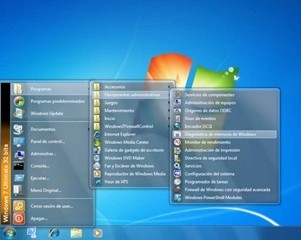
Classic Windows Start Menu in Windows 7 : Classic Windows Start Menu is a small tool that gives you  the Windows XP classic start menu in Windows Vista and Windows 7. Classic Windows Start Menu has the theme of vista and windows 7 Aero with transparent Glass effects. Classic Windows Start Menu brings the Windows XP-style menu that you can call in the same ways you used to do before: Win key, Ctrl+Esc or clicking left mouse button on the Windows logo.

Auto Wallpaper Change With AutoWallpaper

AutoWallpaper 1.2.4.1 x64 / 1.2.3.1 Release Date: 2009-10-31
AutoWallpaper 1.2.4.1 x64 / 1.2.3.1 File Size: 3 MB / XP / 2003 / Vista / XP X64 / 2008 / Windows 7
Download Free AutoWallpaper 1.2.4.1 x64 / 1.2.3.1
AutoWallpaper 1.2.4.1 x64 / 1.2.3.1 Website

AutoWallpaper is an application that manages desktop wallpapers automatically. AutoWallpaper will automatically change the wallpaper at user specified intervals. AutoWallpaper can be run at every start up and it resides in the system tray most of the time.

AutoWallpaper looks in a specified folder for images. AutoWallpaper then uses these images as the wallpapers to choose from. With AutoWallpaper - you'll always have a new desktop backgound anytime you want.

Requires .NET Framework

Windows 7 Login Changer

Windows 7 Login Changer

Windows 7 Login Changer 0.0.0.9 Release Date: 2009-09-20
Windows 7 Login Changer 0.0.0.9 File Size: 735KB
Windows 7 Login Changer 0.0.0.9 Website
Download Free Windows 7 Login Changer 0.0.0.9

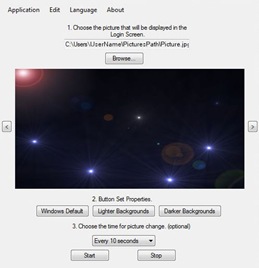
Use this Windows 7 Login Changer application to change the look of Windows 7 logon screen. Change Windows 7 logon screen image at specified intervals (eg: 10 seconds, 1 hour, before log off, etc.) Change its button properties too. Windows 7 Login Changer supports BMP, PNG, JPG, GIF Image formats .

Windows 7 Login Changer Requires: Microsoft .NET Framework 3.5.

Seven Remix XP - Transform XP interface to Windows 7

Seven Remix XP 2.3.1 Release Date: 2009-09-30
Seven Remix XP 2.3.1 File Size: 22.92MB
Download Free Seven Remix XP 2.3.1 to Transform XP interface to Windows 7
Seven Remix XP 2.3.1 Website

Seven Remix XP

The Seven Remix XP application was designed to improve the Graphical interface of your Windows XP as like Windows 7. A great part of the resources of your system files are replaced. Files that contain icons, images, animations are extracts of Windows 7 to update your Windows XP interface to that of Windows 7. The Seven Remix XP  installer automates the process of substitution of system files. Seven Remix XP applies adjustments in the windows registry, it installs programs of third, skins and visual extras like sounds, styles, etc.

In addition, Seven Remix XP makes a backup of its archives in case that it needs to recover them. In case of not being contented with the waited for results of Seven Remix XP, it is completely removable. It is as easy as running the uninstaller from the Beginning menu or Adding or clearing programs.

This Seven Remix XP installer is designed to work on the following operating systems and languages:

  • Windows XP (Home, Pro, RTM, SP1, SP2, SP3, Corporate)
  • Windows 2003 (Standard, Enterprise, Datacenter, Web, RTM, SP1)
  • Windows Media Center Edition (2003, 2004, 2005)
  • Windows XP Tablet PC Edition
  • All Language Versions
  • Does NOT work with 64 bit versions of Windows!

Windows 7 UxTheme Patch

UxTheme Patch for Windows 7 Release Date: 2008-5-16
UxTheme Patch for Windows 7 File Size: 423 KB / Windows 7
Download Free UxTheme Patch for Windows 7
UxTheme Patch for Windows 7 Website

This UxTheme Patch for Windows 7 removes the aforementioned checks to provide the Microsoft Windows enthusiast community a free and easy way to enable third-party customization of the entire Microsoft Windows user interface. UxTheme Patch for Windows 7 contains 3 DLL files that you can easily unrar and use.

The theme manager (implemented in Uxtheme.dll), introduced back in Windows Codename: Whistler days, is responsible for drawing non-client parts of every window displayed within Microsoft Windows according to the styles defined in your active theme.

XPize XP Theme and Style Customizer


XPize 5 Release 6 Release Date: 2009-09-02
XPize 5 Release 6 File Size: 15.52MB
Download Free XPize 5 Release 6
XPize 5 Release 6 Website

XPize
XPize is a GUI enhancer for Windows XP and above. XPize replaces most of the non-XP icons, avis and bmps that Microsoft has always overlooked. The XPize installer simply automates the process of replacing resources in critical system files, making your XP's look better. XPize also includes some extras and a reloader, which you can use after visiting Windows Update.

XPize is compatible with any version (both 32-bit and 64-bit) and any language of Windows XP (Home, Pro & MCE) and 2003.