Blog Archive

Showing posts with label Opera. Show all posts

Opera Google Reader in iOS Mode

Opera Google Reader Extension in iOS Mode 
Google Reader

Google Reader Opera extension in iOS mode provides the most favorite web based RSS Feed reader designed for iOS devices. This interface is primarily designed for iOS devices like iPhone and iPad but looks cool on all mobile phone and sidebar (web panels)

Google Reader [iOS mode] 1.0 Opera extension released on October 29th, 2010. Download Free Google Reader [iOS mode] 1.0 Opera extension. Google Reader [iOS mode] 1.0 File Size . Google Reader Opera extension in iOS mode Website

Free Opera Backup Software

Free Opera Backup Software
Opera Backup Professional is a free backup software for Opera browser settings and configuration. Download Free Opera Backup Professional to backup your Opera settings. Opera Backup Professional File Size 600 KB. Opera Backup Professional Website

Opera Backup Software
Free Opera Backup Software

Opera Backup Professional is a lightweight backup software that allows you to completely backup all settings and configuration for your Opera browser including backup of Opera Bookmarks, Wand’s saved passwords, Opera Search Engine, Opera Speed Dial, Session, Toolbar, Preferences, Off-line emails and other personal settings. Although Opera provides you its ‘My Opera Links’ service that allows you to backup and synchronize your Opera Bookmarks, Search Engine, Speed Dial, Notes, on the cloud. But Opera Backup Professional software gives you more options that allows you to back up your Opera completely.

With Opera Backup Professional software its possible make successful migration between two operating system (for example: Windows XP to Windows 7).

Opera Backup Professional requires .NET Framework 2.0 and Opera

Get Facebook Profile : Check Facebook Profile and Photo Albums

Get Facebook Profile Released on January 10th, 2011
Get Facebook Profile File Size: 10 KB | Download Free Get Facebook Profile 1.1
Get Facebook Profile Website

Check Facebook Profile and Photo Albums: When you browse on the Internet you will probably stumble on a direct link to a Facebook image. After click on that link sometimes you want do check out that persons Profile or Photo Albums. Using this Get Facebook Profile Opera Extension you will be able to do just that. Just paste the link in the textbox and choose if you want to go the person's Profile or Photo Album.

Get Facebook Profile Requires Opera 11 or higher

We Are Unable To Find iTunes On Your Computer - Fix

We Are Unable To Find iTunes On Your Computer - Fix

We Are Unable To Find iTunes On Your Computer - Fix
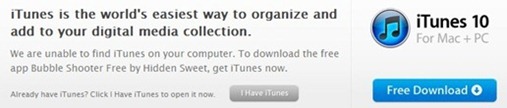
If you browse iTunes App Store website with Opera (or in Chrome), you may get this  message on top of a application page  even if you have installed iTunes properly, “We are unable to find iTunes on your computer.”

Because App Store website is unable to find iTunes on your computer the it dose not open that particular App Store webpage in iTunes when you click on that blue ‘View In iTunes’ button. Instead it redirect you to the iTunes download  page.

Opera View In iTunes Fix for App Store

Opera View In iTunes Fix for App Store:

1. Visit a app store page itunes.apple.com with Opera

2. Right Click on the page blank area for the drop down menu

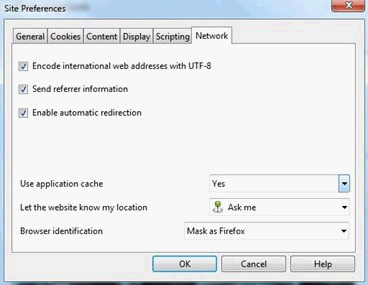
3. Click on “Edit Site Preferences …”  for the drop down menu

4. Go to the “Network” tab for Site Preferences option box

5. Choose “Mask as Firefox” from ‘Browser Identification’  dropdown option

6. Refresh the page, now the ‘View In iTunes’ button will launch iTunes properly

Opera View In iTunes Fix Related:
Opera : Add More Speed Dial Buttons
iTunes 10.1 with AirPlay for iOS 4.2
Chrome View In iTunes Fix
Remove Opera ‘Menu’ Text

Opera 11 Alpha with Extensions


Opera 11 Alpha Release Date: 2010-10-21
Opera 11 Alpha File Size: 9,280 kb
Download Free Opera 11 Build 1029 Alpha with extension
Opera 11 Alpha Website

2010-10-22_043759

Opera 11 alpha is now available for download with the power of extensions support. Along with Opera 11 extensions this new update offers HTML5 events, websockets, new bookmarks bar and an overall performance improvement. With the release of Opera 11 alpha, Opera launches its official extension webpage with some useful extensions like, FastestTube - YouTube Video Downloader, FaceChat for Facebook, Delicious Extension,  Opera to Phone, Mouse trail, External Scripts and more.

Opera USB 10.60 Portable

Opera@USB 10.60 Release Date: 2010-07-04

Opera@USB 10.60 File Size: 13.61MB


Download Free Opera@USB 10.60 
Opera@USB 10.60 Website


Opera USB 10.60 Portable


Opera USB 10.60 Portable


Opera@USB is the portable version of the new Opera 10.60 Browser. Opera USB 10.60 is completely portable for USB / flash drive and it got all the features of the new Opera 10.60 version including tabbed browsing, pop-up blocking, integrated searches and advanced functions like Opera’s groundbreaking e-mail client, RSS Newsfeeds and IRC chat.


Opera USB 10.60 Portable Features:


  • Opera USB Portable makes no unwanted effects on IE or other browsers


  • existing Opera versions are not affected with this Opera USB version


  • Opera USB Portable make no entries to the registry


  • works with every Windows PC (company,Internetcafe, friends,..)


  • Opera USB Portable leave no data on the host computer


Remove Opera ‘Menu’ Text from Menu Button

Remove Opera ‘Menu’ Text from Menu Button
Opera Menu Button Text Opera Menu Button

By default the Opera 10.60 shows its top menu button logo with the ‘Menu’ text . The Opera  menu button is in the same line of its tab panel and you will feel it is wasting some space with the ‘Menu’ text when it is loaded with dozens of tabs. You can remove the Opera ‘Menu’ Text from its Menu Button by :

Right Click On It –> Customize –> Appearance –> Style and select "Images Only"

Opera 10.60 Download

Opera 10.60 is the fastest Web browser available, and offers many powerful features with a new and beautiful minimalistic design.

New in Opera 10.60 :

  • Opera 10.60 has optimized JavaScript engine that is over 50% faster than in Opera 10.50.
  • Opera 10.60 has enhanced its support for advanced Web standards such as HTML5 and WebM video is now included.
  • Opera 10.60 can prompt you to share your location, making geolocation-supporting websites more useful.
  • Opera 10.60 now shows you search suggestions for selected providers help you enter find results more easily.
Opera 10.60 Release Date: 2010-07-01
Opera 10.60 File Size: 10.33MB
Download Free Opera 10.60
Opera 10.60 Website

Opera 10.10 with Opera Unite

Opera 10.10 with Opera Unite
Opera 10.10

Then new Opera 10.10 Final with the unique Opera Unite feature has released on Oct 22 2009. Opera version 10.10 also has its Opera Turbo feature, that compress web pages  to boost up page loading speed. Opera 10.10 File Size is 11.11MB. Download Free Opera 10.10. Opera 10.10 Website.

Mil Free Internet Eraser

Mil Free Internet Eraser 3.1 Release Date: 2009-06-17
Mil Free Internet Eraser 3.1 File Size: 1.64MB

Mil Free Internet Eraser 3.1 Website
Download Free Mil Free Internet Eraser 3.1

Mil Free Internet Eraser

Mil Free Internet Eraser is an application designed to protect your privacy. Most people do not know that a lot of information is saved by their computer about what web sites they have visited, what are their user names, passwords, e-mail messages and many more. This means that virtually anyone can see what you have been doing on your computer, which raises severe privacy concerns.

Cleaning up the history of your activities completely and safely is impossible without specialized program. This process must be performed every time you use your computer. Mil Free Internet Eraser simplifies this task to a single mouse click.

Mil Free Internet Eraser Features:

  • Cleans and shreds Index.dat files (with the exception of temporary Internet files: you will need Mil Shield to clean these index.dat files).
  • Cleans Internet Explorer browse history.
  • Removes Internet Explorer typed URL history.
  • Cleans Firefox history.
  • Removes Internet Explorer cookies.
  • Removes Firefox cookies.
  • Supports Vista 32 & 64-bit, Firefox 3, IE 8 and Opera.

Mil Free Internet Eraser Supports: Windows XP/XP x64/Vista/Vista x64.

Backup Internet Explorer Firefox Safari Chrome Opera Settings With FavBackup

Backup Internet Explorer Firefox Safari Chrome Opera

FavBackup 1.0.2 Release Date: 2009-7-13
FavBackup 1.0.2 File Size: 3.5 MB / Windows 2K / XP / 2003 / Vista

FavBackup 1.0.2 Website
Download Free FavBackup 1.0.2

FavBackup is a simple solution for you to backup and restore Internet Explorer, Firefox, Opera, Chrome and Safari settings and other data. Simply select your browser and the action you want to perform. FavBackup can backup your browsers bookmarks, cookies, stored passwords, browsing history and user preferences.

FavBackup 1.0.2 Related Software:
All Browser Bookmarks Synchronizer
Run IE6 IE7 IE8 at Same Time
Google Chrome Backup
Set Default Browser
IE Session Manager

Set Default Browser

Default Browser 1.8 Release Date: 2009-03-06
Default Browser 1.8 File Size: 31.0KB

Default Browser 1.8 Website
Download Free DefaultBrowser 1.8


Default Browser allows you set the default web browser for your user profile in Windows XP, without affecting the other users. The list of browsers you see in the Presets are tested and working flawlessly as user defaults.

Works with the following browsers:

All Browser Bookmarks Synchronizer

Transmute 1.08 Release Date: 2008-12-23
Transmute 1.08 File Size: 1.38MB

Transmute 1.08 Website
Download Free Transmute 1.08

Transmute  Bookmarks Synchronizer 
Bookmarks Synchronizer : Transmute is a free bookmark utility that helps you to synchronize bookmarks between web browsers.  Transmute can synchronize bookmarks between Firefox, Google Chrome , Opera, Internet Explorer, Safari, Chromium, Flock, SeaMonkey Browser.  Just Select the Bookmark Source Browser & the Target browser from the drop down list & click the Export button to start synchronizing . You can choose to export these bookmark in a specific folder or in the root folder of the Targeted Browser.

Transmute Bookmarks Synchronizer Requires: Microsoft .NET Framework 2.0.

Transmute Bookmarks Synchronizer Related :
Chrome Cache Viewer
Google Chrome Backup
Del.icio.us Bookmark Visualized
All Browser Bookmark Code

Opera 9.60 Final Download

Download Opera 9.60 Browser
Opera 9.60 Release Date: 2008-10-07
Opera 9.60 File Size: 7.10MB

Opera 9.60 Website
Download Free Windows Opera 9.60 | Mac OS X Opera 9.60

Opera 9.60 Final

Opera 9.60 Final: Opera is now more fast and more secure browser then ever with the release of the version 9.60 Final. Opera 9.60 Final has improved its features in Opera Link and Opera Mail. Opera 9.60 has the new feature Opera Scroll Marker makes easier to continue reading when you scroll through a Web page. Opera 9.60 More New Features.

Opera 9.60 Final Related:
Opera Cache File Viewer
Hack Opera Speed Dial
Opera 9.50 Final
Firefox Chrome Theme
Crap Cleaner

Opera Cache File Viewer

Opera Cache View Release Date: 2008-09-22
Opera Cache View File Size: 42KB

Opera Cache View Website
Download Free Opera Cache View 1.02

Opera Cache View

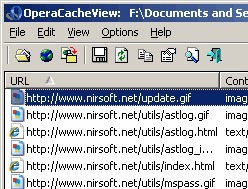
Opera Cache View is a small utility that reads the cache folder of Opera Web browser, and displays the list of all files currently stored in the cache. Opera Cache View shows the cache file URL, Content type, File size & more info. Opera Cache View allows you to select one or more items from the cache list, and then extract the files to another folder, or copy the URLs list to the clipboard.

Opera Cache View Related Software:
Firefox Chrome Theme
All Browser Bookmark Code
Opera Speed Dial Buttons
Download Flash Player 10
Opera 9.50 Final

Download Flash Player 10 Beta : IE Firefox Opera Safari

Adobe Flash Player 10 Beta 2 Release Date: 2008-07-03
Adobe Flash Player 10 Beta 2 File Size: 1.76MB

Adobe Flash Player 10 Beta Website

Download Flash Player 10 Beta 2 for IE & AOL
Download Flash Player 10 Beta 2 for Firefox, Netscape, Opera
Download Flash Player 10 ActiveX Control for IE
Download Flash Player 10 Beta 2 in Mac for Safari, Firefox

Download Flash Player 10 : The Adobe Flash Player 10 Beta 2 has released for the Internet Explorer, AOL  Browser , Firefox, Netscape & Opera. The Flash Player 10 has the Key new features like, 3D Effects , Custom Filters and Effects, Flash Player 10 Advanced Text Layout, Enhanced Drawing & Sound APIs & more.

Opera : Add More Speed Dial Buttons

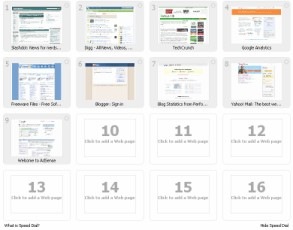
Opera Speed Dial

By Default Opera gives 9 Speed Dial buttons in 3x3 view. If you want to save more of your favorite website in the Opera Speed Dial, go to the: C:\Documents and Settings\_USER_\Application Data\Opera\Opera 9.50\profile
Open the speeddial.ini file & put this:

[Size]
Rows=x
Columns=x

Change the ‘x’ value with number of Speed Dial button you want to show in Rpws & Colums, then save the speeddial.ini file. Restart Opera to get effect of your New Speed Dial.


Related Software:
Opera 9.5 Final
Firefox 3.0 Final